Had to debug a stupid error today being thrown by the VBscript we use to deploy DTS packages. Here's the text of the error:
[DBNETLIB][ConnectionRead (WrapperRead()).]
Pretty helpful, huh?
Although it wasn't difficult to debug after I got access to the script source. Here's the line that was producing the error:
Set oPackageSQLServer = oApplication.GetPackageSQLServer(sDestServer, sUser , sPwd , 0)
I tried connecting to the server using the same credentials, which broke with another unhelpful error. Then I logged into the server directly and tried logging in there, where it informed me that the default database for that user was unavailable. Aha! That DB was in the middle of a restore. So I changed the default database and was able to transfer packages.
I'm posting this so that somebody trying to track down this error with the PackageSQLServer object might land here and see this message:
Check your login credentials!
Wednesday, January 31, 2007

Tuesday, January 30, 2007
Blocking Chain script
I had a need to follow some quickly changing blocking chains today, and couldn't find any simple blocking chain scripts that I liked, so I wrote one. It's not the prettiest method, but it's simple, easy to modify, and doesn't rely on lots of hard-to-debug dynamic SQL.
The next updates I'll probably make will be to display only the top-level blockers rather than all blocking chains, and to get rid of the 0s at the end of each blocking chain line.
Here's the SQL:
Sample output:

The next updates I'll probably make will be to display only the top-level blockers rather than all blocking chains, and to get rid of the 0s at the end of each blocking chain line.
Here's the SQL:
if object_id('tempdb..#blockers0') is not null
drop table #blockingchain
create table #blockingchain
(
blockingchain varchar(255)
)
insert into #blockingchain
select cast(spid as varchar(5)) + ' -> ' + cast(blocked as varchar(5))
from master..sysprocesses
where blocked <> 0
while exists (select 1 from #blockingchain where cast((substring(right(blockingchain, 5), 1 + charindex('>', right(blockingchain, 5)), 5)) as smallint) <> 0)
begin
update bc set blockingchain = blockingchain + ' -> ' + cast(sp.blocked as varchar(5))
from #blockingchain bc
inner join master..sysprocesses sp
on cast((substring(right(bc.blockingchain, 5), 1 + charindex('>', right(bc.blockingchain, 5)), 5)) as smallint) = sp.spid
end
select * from #blockingchain
order by len(blockingchain) asc,
substring(blockingchain, 1, charindex('-', blockingchain)) asc
Sample output:

Wednesday, January 17, 2007
Changing the Domain for a SQL 2005 Cluster
NOTE: It looks like my old DBAIQ blog may be down for the count due to Blogger issues, and I didn't want to lose my post on changing the domain for a SQL 2005 cluster, so I retrieved it from Google's search cache, and am reprinting it here. Ironic that Google was both the cause of its destruction (taking over Blogger and breaking our team blog) and its recovery (search cache).
We're moving our Dev environment to a new domain for some unfathomable corporate reason, and it's going to be a major headache. Among our 20+ SQL Servers in the environment, we've got a few SQL 2005 clusters. According to Microsoft, we can't move them without uninstalling SQL.
http://support.microsoft.com/kb/915846/en-us
Needless to say, this would add more pain to the migration process. It wouldn't be the end of the world, but this is weekend work, and uninstalling and re-installing a couple active/active SQL clusters is just the thing to turn 1 day of work into 2+.
However, I think they're wrong.
I built two virtual machines on VMWare Server, added them to a cluster (see Repeatable Read for instructions on creating shared disks in VMWare) on our current domain, and created some databases. Verified failover capability and connectivity.
Then I moved both nodes to the new domain using the following steps:
1) Take all cluster resources offline (except the quorum, which cannot be taken offline)
2) Stop the cluster service on both nodes
3) Change the cluster service startup type to Manual
4) Change the domain of each machine to the new domain and reboot
5) After reboot, on each machine, change the cluster and SQL service accounts to accounts in the new domain
6) Run gpedit.msc or otherwise access Local Security Policy Settings (see below), and grant the following rights:
Cluster Service Account
Act as part of the operating system
Adjust memory quotas for a process
Debug programs
Increase scheduling priority
Manage auditing and security log
Restore files and directories
SQL Service Account
Adjust memory quotas for a process
Lock pages in memory
Log on as a batch job
Log on as a service
Replace a process level token
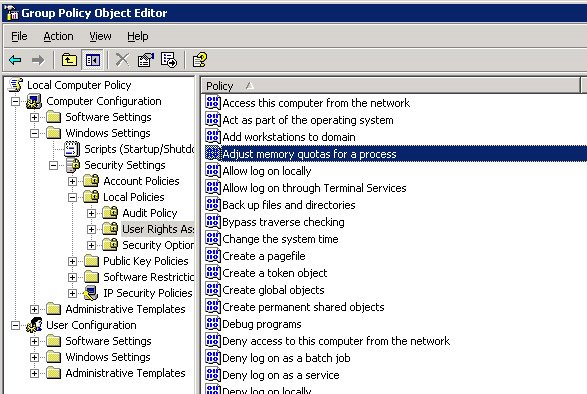
7) Add the cluster and SQL service accounts to the local Adminstrators group. NOTE: This should not be necessary for SQL, and I will update this with the minimum required permissions as soon as I sort them out. It is necessary for the cluster account, however.
8) Start the cluster service on both machines
9) Bring cluster resources online
10) Go enjoy the rest of your weekend
If you missed some permissions, the cluster service will likely fail to start with an error 7023 or 1321, and will helpfully output an error in the system log with eventId 1234 that contains a list of the necessary user rights that still need to be assigned. Now that's error reporting!
Comprehensive testing is still pending, but the preliminary results look good. After this process, SQL Server comes online on my test cluster, as do SQL Agent and Fulltext. I don't have any machines on the new domain with SQL Management Studio installed, but I could connect to SQL using osql directly on one of the cluster nodes. If anyone out there has any different experiences or comments, I'd love to hear them.
UPDATE:
My previous post left out one small but significant detail: the domain groups under which the SQL Server service accounts run. When one installs SQL 2005 on a cluster, the setup program requires domain groups to be entered for each service account. So for example:
SQL Server service account: OLDDOMAIN\SQLService
SQL Agent service account: OLDDOMAIN\SQLAgentService
SQL Browser service account: OLDDOMAIN\SQLBrowserService
Domain groups:
OLDDOMAIN\SQLServiceGroup
OLDDOMAIN\SQLAgentServiceGroup
OLDDOMAIN\FullTextGroup
Then it comes time to move your cluster, and you've followed my steps above or done your own hacking, and you've changed the service accounts to NEWDOMAIN\SQLService and so on. But the domain groups remain the same. Your cluster will come online and fail over and operate fine, but you won't be able to change it.
This was made evident when I tried to add a node to an existing cluster after moving it to a new domain. It gave me a message like "Cannot add NEWDOMAIN\SQLService to OLDDOMAIN\SQLServiceGroup." Arrgh. Microsoft had already claimed that this was not supported, so I suppose I shouldn't have been surprised.
So I started searching for the reference to OLDDOMAIN\SQLServiceGroup. And couldn't find it. Not in a config file, or a system table (I know, that was dumb, but I was desperate), or the registry, where I expected to find it. Eventually, I started combing the registry key by key within the SQL hives and came across this in HKLM\SOFTWARE\Microsoft\Microsoft SQL Server\MSSQL.1\Setup...
(okay, I tried to upload another image here to illustrate, but Blogger hates me, so screw it.)
The keys AGTGroup, FTSGroup, and SQLGroup contain the SIDs for whatever OLDDOMAIN groups you set up when installing SQL. Find the SIDs for your new domain groups (the VBScript below is how I did it), enter those in place of the old ones, restart SQL, and your cluster is moved. You should now be able to add or remove nodes, install hotfixes, etc. You'll need to update the SIDs for each SQL installation (MSSQL.2, MSSQL.3, etc.)
As with any unsupported operation, your mileage may vary, but let me know if you have a different experience with this or you run into additional problems.
We're moving our Dev environment to a new domain for some unfathomable corporate reason, and it's going to be a major headache. Among our 20+ SQL Servers in the environment, we've got a few SQL 2005 clusters. According to Microsoft, we can't move them without uninstalling SQL.
http://support.microsoft.com/kb/915846/en-us
Needless to say, this would add more pain to the migration process. It wouldn't be the end of the world, but this is weekend work, and uninstalling and re-installing a couple active/active SQL clusters is just the thing to turn 1 day of work into 2+.
However, I think they're wrong.
I built two virtual machines on VMWare Server, added them to a cluster (see Repeatable Read for instructions on creating shared disks in VMWare) on our current domain, and created some databases. Verified failover capability and connectivity.
Then I moved both nodes to the new domain using the following steps:
1) Take all cluster resources offline (except the quorum, which cannot be taken offline)
2) Stop the cluster service on both nodes
3) Change the cluster service startup type to Manual
4) Change the domain of each machine to the new domain and reboot
5) After reboot, on each machine, change the cluster and SQL service accounts to accounts in the new domain
6) Run gpedit.msc or otherwise access Local Security Policy Settings (see below), and grant the following rights:
Cluster Service Account
Act as part of the operating system
Adjust memory quotas for a process
Debug programs
Increase scheduling priority
Manage auditing and security log
Restore files and directories
SQL Service Account
Adjust memory quotas for a process
Lock pages in memory
Log on as a batch job
Log on as a service
Replace a process level token
7) Add the cluster and SQL service accounts to the local Adminstrators group. NOTE: This should not be necessary for SQL, and I will update this with the minimum required permissions as soon as I sort them out. It is necessary for the cluster account, however.
8) Start the cluster service on both machines
9) Bring cluster resources online
10) Go enjoy the rest of your weekend
If you missed some permissions, the cluster service will likely fail to start with an error 7023 or 1321, and will helpfully output an error in the system log with eventId 1234 that contains a list of the necessary user rights that still need to be assigned. Now that's error reporting!
Comprehensive testing is still pending, but the preliminary results look good. After this process, SQL Server comes online on my test cluster, as do SQL Agent and Fulltext. I don't have any machines on the new domain with SQL Management Studio installed, but I could connect to SQL using osql directly on one of the cluster nodes. If anyone out there has any different experiences or comments, I'd love to hear them.
UPDATE:
My previous post left out one small but significant detail: the domain groups under which the SQL Server service accounts run. When one installs SQL 2005 on a cluster, the setup program requires domain groups to be entered for each service account. So for example:
SQL Server service account: OLDDOMAIN\SQLService
SQL Agent service account: OLDDOMAIN\SQLAgentService
SQL Browser service account: OLDDOMAIN\SQLBrowserService
Domain groups:
OLDDOMAIN\SQLServiceGroup
OLDDOMAIN\SQLAgentServiceGroup
OLDDOMAIN\FullTextGroup
Then it comes time to move your cluster, and you've followed my steps above or done your own hacking, and you've changed the service accounts to NEWDOMAIN\SQLService and so on. But the domain groups remain the same. Your cluster will come online and fail over and operate fine, but you won't be able to change it.
This was made evident when I tried to add a node to an existing cluster after moving it to a new domain. It gave me a message like "Cannot add NEWDOMAIN\SQLService to OLDDOMAIN\SQLServiceGroup." Arrgh. Microsoft had already claimed that this was not supported, so I suppose I shouldn't have been surprised.
So I started searching for the reference to OLDDOMAIN\SQLServiceGroup. And couldn't find it. Not in a config file, or a system table (I know, that was dumb, but I was desperate), or the registry, where I expected to find it. Eventually, I started combing the registry key by key within the SQL hives and came across this in HKLM\SOFTWARE\Microsoft\Microsoft SQL Server\MSSQL.1\Setup...
(okay, I tried to upload another image here to illustrate, but Blogger hates me, so screw it.)
The keys AGTGroup, FTSGroup, and SQLGroup contain the SIDs for whatever OLDDOMAIN groups you set up when installing SQL. Find the SIDs for your new domain groups (the VBScript below is how I did it), enter those in place of the old ones, restart SQL, and your cluster is moved. You should now be able to add or remove nodes, install hotfixes, etc. You'll need to update the SIDs for each SQL installation (MSSQL.2, MSSQL.3, etc.)
As with any unsupported operation, your mileage may vary, but let me know if you have a different experience with this or you run into additional problems.
SQL Litespeed works better when unregistered
I recently set up a new DR server that had recently been built from scratch, and the DBAs who set it up didn't have a product key for SQL Litespeed, which we use to backup all of our databases. If you don't know about Litespeed, go check it out, it's handy. So the DBAs set it up using a trial version of the software.
After that, I set up an automatic restore process on the DR servers, but it was taking forever. A backup that would restore in 4-5 hours on the hardware-inferior DR QA server would take 18-20 hours on the Production DR server. This gave us a potentially long recovery time and precluded using the DR machine for reporting or other tasks. I ran a series of diagnostics against the server, and eventually even involved the SAN team, but everything looked fine - disk queues and CPU usage were low, the drives were clearly capable of much higher IOs, etc.
Then one day, the restores sped up. Not by a little bit, but by 10x - from 18 hours to 85-90 minutes. Hey, cool. Except I didn't know what had happened. But it was working and I had other stuff to do, so I left it alone.
A week later, I attempted to take a backup of a DB on that server and got an error message informing me that SQL Litespeed's trial period had expired. I checked that the backups were still restoring, which they were, and sent another request for a Litespeed license.
The request came through a few weeks later, and on the day that Litespeed was officially registered, the backups started taking 18 hours again. Bizarre? Yeah. I'm tempted to uninstall the licensed version and run it in trial mode again unless Quest can give me a good explanation as to why this is happening and how to fix it.
Here's some sample output from Litespeed on our server, with sensitive data redacted. Emphasis is mine.
Executed as user: [user]. Warning: Null value is eliminated by an aggregate or other SET operation. [SQLSTATE 01003] (Message 8153) Processed 29616984 pages for database '[dbname]', file '[dbname]_Data' on file 1. Processed 26037664 pages for database '[dbname]', file '[dbname]_Data2' on file 1. Processed 23631992 pages for database '[dbname]', file '[dbname]_Data3' on file 1. Processed 16 pages for database '[dbname]', file '[dbname]_Log' on file 1. RESTORE DATABASE successfully processed 79286656 pages in 5051.204 seconds (128.586 MB/sec). CPU Seconds: 8190.55 Environment: Intel(R) Xeon(TM) MP CPU 3.00GHz CPUs: 8 logical, 8 cores, 8 physical packages. [SQLSTATE 01000] (Message 1). The step succeeded.
Executed as user: [user]. Warning: Null value is eliminated by an aggregate or other SET operation. [SQLSTATE 01003] (Message 8153) Processed 29616984 pages for database '[dbname]', file '[dbname]_Data' on file 1. Processed 26037664 pages for database '[dbname]', file '[dbname]_Data2' on file 1. Processed 23631992 pages for database '[dbname]', file '[dbname]_Data3' on file 1. Processed 16 pages for database '[dbname]', file '[dbname]_Log' on file 1. RESTORE DATABASE successfully processed 79286656 pages in 69992.264 seconds (9.279 MB/sec). CPU Seconds: 7422.05 Environment: Intel(R) Xeon(TM) MP CPU 3.00GHz CPUs: 8 logical, 8 cores, 8 physical packages. [SQLSTATE 01000] (Message 1). The step succeeded.
After that, I set up an automatic restore process on the DR servers, but it was taking forever. A backup that would restore in 4-5 hours on the hardware-inferior DR QA server would take 18-20 hours on the Production DR server. This gave us a potentially long recovery time and precluded using the DR machine for reporting or other tasks. I ran a series of diagnostics against the server, and eventually even involved the SAN team, but everything looked fine - disk queues and CPU usage were low, the drives were clearly capable of much higher IOs, etc.
Then one day, the restores sped up. Not by a little bit, but by 10x - from 18 hours to 85-90 minutes. Hey, cool. Except I didn't know what had happened. But it was working and I had other stuff to do, so I left it alone.
A week later, I attempted to take a backup of a DB on that server and got an error message informing me that SQL Litespeed's trial period had expired. I checked that the backups were still restoring, which they were, and sent another request for a Litespeed license.
The request came through a few weeks later, and on the day that Litespeed was officially registered, the backups started taking 18 hours again. Bizarre? Yeah. I'm tempted to uninstall the licensed version and run it in trial mode again unless Quest can give me a good explanation as to why this is happening and how to fix it.
Here's some sample output from Litespeed on our server, with sensitive data redacted. Emphasis is mine.
Executed as user: [user]. Warning: Null value is eliminated by an aggregate or other SET operation. [SQLSTATE 01003] (Message 8153) Processed 29616984 pages for database '[dbname]', file '[dbname]_Data' on file 1. Processed 26037664 pages for database '[dbname]', file '[dbname]_Data2' on file 1. Processed 23631992 pages for database '[dbname]', file '[dbname]_Data3' on file 1. Processed 16 pages for database '[dbname]', file '[dbname]_Log' on file 1. RESTORE DATABASE successfully processed 79286656 pages in 5051.204 seconds (128.586 MB/sec). CPU Seconds: 8190.55 Environment: Intel(R) Xeon(TM) MP CPU 3.00GHz CPUs: 8 logical, 8 cores, 8 physical packages. [SQLSTATE 01000] (Message 1). The step succeeded.
Executed as user: [user]. Warning: Null value is eliminated by an aggregate or other SET operation. [SQLSTATE 01003] (Message 8153) Processed 29616984 pages for database '[dbname]', file '[dbname]_Data' on file 1. Processed 26037664 pages for database '[dbname]', file '[dbname]_Data2' on file 1. Processed 23631992 pages for database '[dbname]', file '[dbname]_Data3' on file 1. Processed 16 pages for database '[dbname]', file '[dbname]_Log' on file 1. RESTORE DATABASE successfully processed 79286656 pages in 69992.264 seconds (9.279 MB/sec). CPU Seconds: 7422.05 Environment: Intel(R) Xeon(TM) MP CPU 3.00GHz CPUs: 8 logical, 8 cores, 8 physical packages. [SQLSTATE 01000] (Message 1). The step succeeded.
Monday, December 18, 2006
Work in Progress: Ira's Home Theater
As it says in my profile, I'm an audiophile and an equipment junkie, so I had to post(/brag) about my home theater system. It's not the most expensive setup around, but it sounds pretty damn good for anything from Autechre to zydeco, and The Matrix shakes the floor.
Speakers
2x JBL LSR32s
2x Bose 301 (my roommate's old speakers, being used as surrounds)
1x B&W CC6 center channel
1x Aguilar GS212
Amps
1x TEAC POS receiver
1x Harman Kardon AVR 330
1x Crown K1
1x SWR 750x
Power
1x Monster Power HTS 3600
Interconnects
Tara Labs Prism Omni speaker cables, Canare L-2T2S interconnects, Vampire, Homegrown, and Canare connectors, all hand-terminated with Cardas or Kester solder
Display
1x Westinghouse LVM37-w1
1x Samsung LN-T5265F
Sources
1x XBox 360
1x HTPC runningWindows XP Windows Vista Ultimate
1x Scientific Atlanta 8300 HDC
Miscellaneous
1x Logitech Harmony 890 universal remote
2x nameless black wood speaker stands
2x American Recording Technologies studio monitor stands
UPDATE (1/15/07):
Picked up a Harman Kardon AVR 330. The 645 was overkill for what I wanted, since I don't use HDMI at this point, and the 330 was a steal. I also got a pair of JBL E30s with it, which I'll either use as surrounds or give to my parents.
UPDATE 2 (2/13/07):
Found a mint B&W CC6 center channel. It's not quite as high-end as I was planning to go, but there's not enough space for a big center speaker, so this one will do nicely until I buy a warehouse. And then I'll just outfit the whole place with Turbosound.
UPDATE 3 (3/12/08):
Well, the Westinghouse TV blew up, but my roommate got his bonus and replaced it with a 52" Samsung that looks quite good on the wall of our new place. I picked up an SWR 750x and an Aguilar GS212 to play my bass through, and that stack is pulling double-duty as a massively overpowered subwoofer. Also got a Monster HTS 3600, mainly so that I could switch off the Crown using a remote. And finally, we got a new couch that sits in the way of the audio rack, so I just HAD to get a Logitech Harmony 890 to control the whole system via RF (and the one-button system configuration is nice, too). Converted all the display cables, too - the 360 now displays via VGA, the Scientific Atlanta PVR via HDMI, and the HTPC via DVI->HDMI.
Speakers
2x JBL LSR32s
2x Bose 301 (my roommate's old speakers, being used as surrounds)
1x B&W CC6 center channel
1x Aguilar GS212
Amps
1x Harman Kardon AVR 330
1x Crown K1
1x SWR 750x
Power
1x Monster Power HTS 3600
Interconnects
Tara Labs Prism Omni speaker cables, Canare L-2T2S interconnects, Vampire, Homegrown, and Canare connectors, all hand-terminated with Cardas or Kester solder
Display
1x Samsung LN-T5265F
Sources
1x XBox 360
1x HTPC running
1x Scientific Atlanta 8300 HDC
Miscellaneous
1x Logitech Harmony 890 universal remote
2x American Recording Technologies studio monitor stands
UPDATE (1/15/07):
Picked up a Harman Kardon AVR 330. The 645 was overkill for what I wanted, since I don't use HDMI at this point, and the 330 was a steal. I also got a pair of JBL E30s with it, which I'll either use as surrounds or give to my parents.
UPDATE 2 (2/13/07):
Found a mint B&W CC6 center channel. It's not quite as high-end as I was planning to go, but there's not enough space for a big center speaker, so this one will do nicely until I buy a warehouse. And then I'll just outfit the whole place with Turbosound.
UPDATE 3 (3/12/08):
Well, the Westinghouse TV blew up, but my roommate got his bonus and replaced it with a 52" Samsung that looks quite good on the wall of our new place. I picked up an SWR 750x and an Aguilar GS212 to play my bass through, and that stack is pulling double-duty as a massively overpowered subwoofer. Also got a Monster HTS 3600, mainly so that I could switch off the Crown using a remote. And finally, we got a new couch that sits in the way of the audio rack, so I just HAD to get a Logitech Harmony 890 to control the whole system via RF (and the one-button system configuration is nice, too). Converted all the display cables, too - the 360 now displays via VGA, the Scientific Atlanta PVR via HDMI, and the HTPC via DVI->HDMI.
Lists vs. temp tables
Dynamic SQL is in heavy use at my new office, and I'm not sure how I feel about a lot of it. For example, one of my coworkers showed me a neat trick by which one can append to a string with each successive row returned in a select statement, like so:
select @list = @list + cast(foo as varchar(10)) + ',' from #test2
But I noticed that this technique was used in many pieces of code in our system, and it bothered me, because I was pretty sure that creating and joining to temp tables would be faster than assembling long strings and then using them with "in" clauses. I wasn't positive, however, so I assembled this test script:
The results of this test vary somewhat, so it would be best to run the whole thing in a loop to assemble a statistically valid set of data, but the difference between the two methods is so pronounced that the SD doesn't really matter. Ready for the (approximate) difference?
Temp tables are 3x faster then strings.
Here's a typical result of this script running on our QA server, an 8-CPU 20-GB box running SQL 2000 build 2171:

Running it repeatedly yielded similar results with some higher outliers, but very few lower ones. The next problem will be how to propose changing our coding practices and re-writing a lot of stored procs. Stay tuned for that one, and possibly an entry about my subsequent de-hiring.
select @list = @list + cast(foo as varchar(10)) + ',' from #test2
But I noticed that this technique was used in many pieces of code in our system, and it bothered me, because I was pretty sure that creating and joining to temp tables would be faster than assembling long strings and then using them with "in" clauses. I wasn't positive, however, so I assembled this test script:
SET NOCOUNT ON
if OBJECT_ID('tempdb..#timing') is not null
drop table #timing
if OBJECT_ID('tempdb..#test1') is not null
drop table #test1
if OBJECT_ID('tempdb..#test2') is not null
drop table #test2
declare
@i int
, @items int
set @items = 1022
create table #timing
(
testrun varchar(100)
, setupStartTime datetime
, setupEndTime datetime
, setupElapsed as datediff(ms, setupStartTime, setupEndTime)
, queryStartTime datetime
, queryEndTime datetime
, queryElapsed as datediff(ms, queryStartTime, queryEndTime)
, totalElapsed as datediff(ms, setupStartTime, setupEndTime) + datediff(ms, queryStartTime, queryEndTime)
)
select
identity(int, 10403, 96) as foo
, cast('some text' as varchar(20)) as bar
into
#test1
set @i = 0
while @i < @items begin insert into #test1 select 'cowabunga' set @i = @i + 1 end insert into #timing (testRun, setupStartTime) values ('Temp Table', getDate()) select foo into #test2 from #test1 create clustered index ix on #test2 (foo) update #timing set setupEndTime = getDate() where testRun = 'Temp Table' create clustered index ix on #test1 (foo) insert into #timing (testRun, setupStartTime) values ('List', getDate()) declare @list varchar(7000), @curID int set @list = '(' select @curID = min(foo) from #test2 --while @curID is not null --begin -- select @list = @list + cast(@curId as varchar(10)) + ',' -- select @curId = min(foo) from #test2 where foo > @curID
--end
select @list = @list + cast(foo as varchar(10)) + ',' from #test2
set @list = substring(@list, 0, len(@list) - 1) + ')'
declare @sql varchar(8000)
set @sql = 'select * from #test1 where foo in ' + @list
update #timing
set setupEndTime = getDate()
where testRun = 'List'
print(@sql)
update #timing
set queryStartTime = getDate()
where testRun = 'List'
exec (@sql)
update #timing
set queryEndTime = getDate()
where testRun = 'List'
update #timing
set queryStartTime = getDate()
where testRun = 'Temp Table'
select t1.* from #test1 t1
inner join #test2 t2
on t1.foo = t2.foo
update #timing
set queryEndTime = getDate()
where testRun = 'Temp Table'
select * from #timing
The results of this test vary somewhat, so it would be best to run the whole thing in a loop to assemble a statistically valid set of data, but the difference between the two methods is so pronounced that the SD doesn't really matter. Ready for the (approximate) difference?
Temp tables are 3x faster then strings.
Here's a typical result of this script running on our QA server, an 8-CPU 20-GB box running SQL 2000 build 2171:

Running it repeatedly yielded similar results with some higher outliers, but very few lower ones. The next problem will be how to propose changing our coding practices and re-writing a lot of stored procs. Stay tuned for that one, and possibly an entry about my subsequent de-hiring.
Tuesday, December 12, 2006
Shrinking log files of formerly replicated DBs
To start, I should note that a) there's probably a better way to do this, and b) I'm sure this is already out on the net somewhere, possibly even on my old blog as a post from Mike Forman. But this way works, it's fast, and I couldn't Google it when I needed it, so I'm posting it again.
In our QA Static and Dev environments, we have static copies of a DB that is a replication subscriber in Production. This DB gets refreshed (restored) from Production every few weeks, or when I break everything and have to restore a fresh copy. When restored, it still has transactions marked as pending replication in the log, and so the log cannot be shrunk.
Naturally, we don't have as much space as we'd like in QA and Dev, and since the DB in question is static, it doesn't need the 50 GB transaction log that it has in Production. So I wanted to shrink the transaction log, but was prevented from doing so by this error:
Cannot shrink log file 4 (Test_Log1) because all logical log files are in use.
So how do you fix this?
My solution was to fool (read: hack) the system tables to make SQL think this DB was still a replication subscriber, then use sp_repldone to set all the transactions to done. This short script will do it, although I recommend you BE CAREFUL, because this is the master database you're messing with.
sp_configure 'allow updates', 1
reconfigure with override
update master.dbo.sysdatabases set category = 1 --
where dbid = 10 -- replace with appropriate dbid for your DB
use Test
GO
EXEC sp_repldone @xactid = NULL, @xact_segno = NULL, @numtrans = 0, @time = 0, @reset = 1
update master.dbo.sysdatabases set category = 0
where dbid = 10 -- ditto
sp_configure 'allow updates', 0
reconfigure with override
After the sp_repldone, you'll be able to shrink the log file to your heart's content. There may be another way to do this, such as attaching the DB without its log file, but I'm not sure that works, and besides, I like hacking system tables.
In our QA Static and Dev environments, we have static copies of a DB that is a replication subscriber in Production. This DB gets refreshed (restored) from Production every few weeks, or when I break everything and have to restore a fresh copy. When restored, it still has transactions marked as pending replication in the log, and so the log cannot be shrunk.
Naturally, we don't have as much space as we'd like in QA and Dev, and since the DB in question is static, it doesn't need the 50 GB transaction log that it has in Production. So I wanted to shrink the transaction log, but was prevented from doing so by this error:
Cannot shrink log file 4 (Test_Log1) because all logical log files are in use.
So how do you fix this?
My solution was to fool (read: hack) the system tables to make SQL think this DB was still a replication subscriber, then use sp_repldone to set all the transactions to done. This short script will do it, although I recommend you BE CAREFUL, because this is the master database you're messing with.
sp_configure 'allow updates', 1
reconfigure with override
update master.dbo.sysdatabases set category = 1 --
where dbid = 10 -- replace with appropriate dbid for your DB
use Test
GO
EXEC sp_repldone @xactid = NULL, @xact_segno = NULL, @numtrans = 0, @time = 0, @reset = 1
update master.dbo.sysdatabases set category = 0
where dbid = 10 -- ditto
sp_configure 'allow updates', 0
reconfigure with override
After the sp_repldone, you'll be able to shrink the log file to your heart's content. There may be another way to do this, such as attaching the DB without its log file, but I'm not sure that works, and besides, I like hacking system tables.
Subscribe to:
Posts (Atom)