Showing posts with label Python. Show all posts

Monday, March 5, 2012

Python Gets Things Done

A quick example of why I've grown to love Python.

My girlfriend had a laboriously scanned document in two pieces that needed to be combined. I had a .NET command line utility that I wrote a couple years ago that does just that, but because one of the scanned pages was a different size, it got cut off in the resulting output file. So I could either try to dig up some docs on the library I used, play around with Intellisense in Visual Studio, or see if there was a Python library that might work.

2 minutes of Googling later I had pyPDF, and maybe 10 minutes after that, I had reset the mediaBox on the outsized page, written it to a new pdf file, and emailed it off. Q.E.D.

Wednesday, January 18, 2012

If your DATE comes through pyodbc as a unicode, it's probably the driver

File this under "should have been obvious." I had a test script break today because I was trying to do date math on an object that wound up being a unicode instead of a date. I had gotten the variable value from a pyodbc query against a SQL 2008 database table with a DATE column. I knew that DATETIME columns came in as datetime.datetime objects, but the DATE column came in as a unicode, which seemed strange.

Turns out it's the ODBC driver. Demo:

In [78]: cnxn = pyodbc.connect("DSN=local;")

In [79]: crsr = cnxn.execute("select cast('2012-01-01' as date) as bar")

In [80]: r = crsr.fetchone()

In [81]: type(r.bar)
Out[81]: unicode

Then, when switching to SQLNCLI10:

In [96]: cnxn = pyodbc.connect("Driver={SQL Server Native Client 10.0};Server=localhost;Trusted_Connection=Yes;")

In [97]: crsr = cnxn.execute("select cast('2012-01-01' as date) as bar")

In [98]: r = crsr.fetchone()

In [99]: type(r.bar)
Out[99]: datetime.date

Thursday, December 22, 2011

pyodbc isn't playing well with multiprocessing

Wrote my first Python script yesterday that incorporates the multiprocessing module in order to parallelize some CPU-intensive calculations that were going extremely slowly when run in the database. Mission accomplished there, and it was remarkably easy in Python, but then I hit a brick wall when trying to load everything back to the database.

As it turns out, the calculation time is dominated by the database IO (~25 mil rows in and out), so I went about trying to optimize that as best I could. The reads are coming off an SSD, so they're fine, but the writes are UPDATEs, and I didn't want to issue them one at a time and incur all the connection and transaction overhead for each one. Instead, I created a staging table as a heap and batched up INSERTs of my data in a specified batch size (1000 to start) using SQL 2008 row constructors. Then the main table gets updated from the staging table right at the end, so only one giant transaction and UPDATE statement is necessary.

This strategy appeared to work fine when single-threading, but then I figured I'd throw in multiprocessing there, too, since I already had the module imported and had crafted the functions around it. Didn't work.

The error message was 42S02, aka Invalid object specified - in other words, the INSERT can't find the staging table, even though I'm creating it within the Python script, during a single-threaded section before I Pool.map() out different calculated shards to be inserted. SQL Server can obviously accept just about as many threads as you want to throw at it, so that's not the problem. The table exists, which I confirmed by adding a breakpoint (well, a set_trace()) and looking at it through Management Studio. It's all using integrated authentication, and I'm a sysadmin on the server, so there can't be any problems with schema, although I threw in some "dbo." references just to make sure. I even tried to trace the SQLNCLI driver operations, but haven't managed to get usable output yet.

So the only thing I can come up with so far is an incompatibility between pyodbc and multiprocessing. If I get more time to investigate, I'll update the post, but for now I'm just going to have to switch the DB section back to single-threaded. Boo.

Wednesday, November 30, 2011

SQL could use some real string manipulation

In order to remove the first "-" from a string, this is the query I just had to run:

update tbFoo set BBG_ticker = substring(BBG_ticker, 1, charindex('-', BBG_ticker) - 1) + ' ' + substring(BBG_ticker, charindex('-', BBG_ticker)+1, LEN(BBG_ticker) - charindex('-', BBG_ticker))

Does that seem like overkill to anyone else? Let's compare it to Python...

BBG_ticker.replace("-"," ",1)


Wednesday, March 16, 2011

More Resolver One nice-to-haves

Working on Resolver One stuff again, and came up with a few more things I'd like to see.

I've been having problems moving some of my IronPython code out of my worksheet and into an IronPython module, but I assume that's due to my own lack of understanding of the clr - the external libraries seem to get hung up on the import statements and not get any further.

Which leads me to my first request: enable an easy way to reload a workbook. At the moment, any time I make a change in an external file, I have to close the entire workbook and re-open it. I can't just recalculate and have it re-import the module, I have to close the workbook (which generally means the entire program) and re-open it. It would be nice to have a way to "Reload from disk" or something similar that does a thorough reinitialization of the environment.

The second thing is something I just posted about on the Resolver forums, so I'm hopeful that I'll come upon a solution via that line of inquiry, but basically, I want SSL support in Resolver. I was trying to connect to a gmail server and use starttls() from smtplib, but couldn't do it because of the lack of SSL support in IronPython 2.6.0, which I believe is what's under the hood in Resolver One.

I'm using Resolver for a couple projects now, so here's hoping that development continues and that I can see some of these things working in the future.

Thursday, December 16, 2010

More notes on Resolver One

Still generally liking Resolver One, but there are some limitations that are bothering me and associated requests I'd like to make.

1) Sorting!

How is there no sorting in place yet? They implemented CHITEST before sorting-in-place!?

2) Assignment

Some more "magic" assignment methods would be welcome. Something like

myCellRange = myListOfLists # aka 2D array

or

myRow = myList

That seems like a straightforward thing to implement, but instead I have to iterate over both and assign each value manually.

3) Row and Column Numbers

It would be very helpful if the code editor had a display with row and column numbers at the bottom.


Thursday, December 2, 2010

Resolver One CellRange oddities

I've started working on a project in which we're using Resolver One as a dashboard. The workbook consumes multiple data sources (services, DB, YAML files, etc.), collates and formats, and may eventually do other cool stuff like kick off simulations or generate charts. But we're still in the early stages, so I'm just fleshing out the configuration routines and table displays.

What I've found so far is that Resolver One is a cool package, but seems to have some weak points. The documentation is okay, but the layout seems less than intuitive, and the volume of documentation is somewhat lacking in comparison to The Enterprise Spreadsheet app. That's to be expected, so it doesn't bother me much.

The thing that does bother me is an apparent code deficiency in combination with my inability to log into their support forums to ask questions. I assume the forum issue is temporary and will be resolved (ha) shortly, but the code issue seems like a bug.

Basically, my problem is that CellRanges don't act Pythonically, or even correctly, it would seem. For one, you can't do this:

cellrange.HeaderRow = worksheet.HeaderRow

Why not? That seems like the most logical (and Pythonic) operation you could perform. I actually couldn't set the HeaderRow through any means, no matter what sort of value I passed in.

I had a second issue, but I just determined that it was user error and fixed it. Will continue this post if I come across something else...


Friday, March 13, 2009

pyodbc doesn't seem to like BLOBs

I tried to pull a Binary Large OBject out of a SQL Server database yesterday via pyodbc, and it blew up.

In [4]: c = pyodbc.connect('DRIVER={SQL Server};SERVER=servername;')
In [5]: r = c.execute('select Blob from dbo.tbDoc where DocID = 8')
In [6]: row = r.fetchone()
assertion failed: getdata.cpp(171)
cbRead == 0 || pch[cbRead-element_size] != 0

And crashed my IPython shell, to boot.

Python's DB API spec (aka PEP 249) doesn't appear to specify exactly how to handle BLOBs, but it does mention them, so I presume they're supposed to be supported. I wound up grabbing this particular BLOB in a C# app instead, but this seems like it could be an issue in the future, so if anyone knows what's going on, please let me know. Otherwise I'll dig into this issue next time I have some spare time or a pressing need to manipulate BLOBs in Python.

UPDATE: I wasn't on the latest build of pyodbc, so I updated to 2.1.3. After updating, I was able to fetch the binary stream from that row. Hooray!

Although when attempting to print it out, I got some weird behavior - my PC's internal speaker started beeping like mad and the window stopped responding. As my colleague said:

P.V. [1:57 PM]:
What the hell was stored in that blob?
Ira Pfeifer [1:58 PM]:
just a hex stream
P.V. [1:58 PM]:
This is like something from Gibson.

Strange...

Friday, October 3, 2008

Running a Buildbot buildslave as a Windows service

Buildbot is an open source continuous integration system written in Python. We use it to automate the builds on one of the projects I work on, and in general, it's cool. Pretty easy to set up (just make sure you look at every setting in the config file), comes with its own simple but handy web interface, and allows quick configuration of multiple "builders" and "buildslaves."

However, like most open source projects, it's written for and by *nix users and doesn't have full Windows support. Fortunately, Mark Hammond (of win32api fame) deigned to write the buildbot_service.py file, which allows installation of the Buildbot buildmaster as a service.

But despite this, there's no out-of-the-box way to run a buildslave as a service. There are a few other hardy souls out there who have figured out various methods for accomplishing this, and I am indebted to their guides as helpful starting points. But I didn't like all the registry hacking and configuration steps, so I went another way. Hammond's buildbot_service.py scares me, but I gleaned enough from it to put together my own buildslave_service.py.
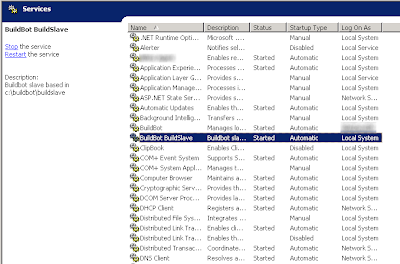
It's not terribly full-featured, and it requires reinstallation if any settings are changed, but it's compact, effective, and easy to install.

Steps:
1) Copy code below, correct spacing that Blogger's HTML window stripped out, change paths as appropriate, save as buildslave_service.py.
2) Install the service (w/ optional parameter for automatic startup if you want):
python buildslave_service.py install [--startup=auto]
3) Start the service:
net start Buildbot_Buildslave
(or use the Services mmc snap-in)

And that's it! Easier than all the registry mess and downloading Win2003 resource packs, no?

""" buildslave_service.py

Original Author: Ira Pfeifer
Email: ipfeifer -dot- tech -at- gmail
"""

import sys
import os
import subprocess
import win32serviceutil
import win32service
import win32event
import win32api
import time

from buildbot.scripts import runner
from buildbot.scripts.startup import start

# change paths as appropriate
slavepath = "c:\\buildbot\\buildslave"
homepath = "\\"
os.environ['HOMEDRIVE'] = "C:"
os.environ['HOMEPATH'] = homepath
os.environ['PATH'] = ";".join([
r"C:\Python25"
,r"C:\Python25\Scripts"
])

class BuildSlaveService(win32serviceutil.ServiceFramework):
_svc_name_ = "BuildBot_BuildSlave"
_svc_display_name_ = "BuildBot BuildSlave"
_svc_description_ = "Buildbot slave based in " + slavepath


def __init__(self, args):
win32serviceutil.ServiceFramework.__init__(self, args)
self.stop_event = win32event.CreateEvent(None, 0, 0, None)

def SvcDoRun(self):
# The service starts a subprocess that will run the actual buildbot
# so that it can be stopped by simply killing off the subprocess.
self.child = subprocess.Popen(["python",
__file__,
"start"])
isAlive = True
while isAlive:
time.sleep(10)

def SvcStop(self):

self.ReportServiceStatus(win32service.SERVICE_STOP_PENDING)
handle = win32api.OpenProcess(1,0,self.child.pid)
# returns exit code - wrap w/ error handling?
win32api.TerminateProcess(handle, 0)
win32api.CloseHandle(handle)
isAlive = False
self.ReportServiceStatus(win32service.SERVICE_STOP_PENDING)
win32.SetEvent(self.hWaitStop)

SvcShutdown = SvcStop

def start_buildslave():
config = runner.Options()
config.parseOptions(['start',slavepath])
so = config.subOptions
start(so)


if __name__ == '__main__':
if len(sys.argv) > 1 and sys.argv[1] == "start":
start_buildslave()
else:
win32serviceutil.HandleCommandLine(BuildSlaveService)

Monday, September 22, 2008

psexec Permission denied error

In the course of my DBA and software dev tasks, I make extensive use of Mark Russinovich's excellent PSTools. Today I ran across an odd error while running a remote command using psexec. Filenames have been changed, obviously, but here's the gist of it:

> psexec \\remotemachine python \\fileserver\script.py param1 param2

python: can't open file '\\fileserver\script.py': [Errno 13] Permission denied

So it was obviously opening python, which I double-checked by running with the -i option and checking the remote machine's desktop using VNC Viewer. The python shell was opening successfully, but it couldn't access the file server. Executing the script directly from the remote machine's command line worked fine.

Then I realized that this was the same issue that one gets from too (two? ;) many linked server hops using integrated authentication - it's a two-hop Kerberos problem. Google that if you don't know what I'm talking about. Fortunately, psexec offers the option of passing a username and password, and as soon as I added those options, my command executed successfully.

Tuesday, August 26, 2008

Float comparison tolerance

Had the age-old problem with significant figures when comparing floats in Python today, and came up with this little function to deal with it. It ensures that the two values are equal down to 10 significant figures, no matter at what scale they start. This is as opposed to the conventional test, which checks at a fixed scale (e.g. return abs(a - b) < 1e-10).

def equal(a, b):
return abs(a - b) <= abs(a - b)/10000000000

Testing:

a = .0000000000000000837
b = .00000000000000004315
c = a + 100
d = b + 100

equal(a,b)
False

equal(b,a)
False

equal(c,d)
True

equal(d,c)
True

equal(1,1)
True

(Of course, we wound up defining a hard limit, 1e-10, and not using my function, but I still thought it was clever.)

UPDATE: Yes, I recognize that this is hardly a new problem or solution, but it's MY BLOG and I mostly use it as a memory aid anyway - outside readers are incidental (which is a good thing, given my Google Analytics stats).

Monday, July 14, 2008

pyodbc returns an int instead of rows in a cursor

Just a quick note about pyodbc: if you're getting a TypeError from a pyodbc cursor because it's an int instead of a rowset, it's probably because the proc or query being called is returning extra info or messages. Try turning off anything that's returning extraneous info, like ANSI_WARNINGS.

Tuesday, June 10, 2008

Returning rows from a stored procedure with pyodbc, pt 2

Pyodbc really doesn't like extraneous information to be returned with its (ONE AND ONLY ONE!) result set from a stored procedure.

In my latest fight with pyodbc, I had a stored proc returning a rowset with a few thousand rows. This worked fine most of the time, except in a few cases with certain input parameters. In those cases, the cursor returned by execute() would contain an int, so any cursor method I called on it would break.

At first I thought I might have hit some kind of row size limit or rowcount limit, but realized the result set wasn't big enough for that to be the case. The proc wasn't throwing off any errors when run in SQL Management Studio with the same input parameters, so that wasn't the problem.

Then I noticed that it was returning a single warning message in the Messages tab.

Warning: Null value is eliminated by an aggregate or other SET operation.

This is a fairly common warning in SQL land, so I hadn't paid any attention to it. But it is possible to suppress, using the following statement:

SET ANSI_WARNINGS OFF

Sure enough, this did the trick. The moral of this story (just like last time) is that pyodbc wants a single rowset and that's it; returning any data in any of the alternate ODBC channels seems to break it, or at least, not yield the cursor in the result set that I expected.

Tuesday, May 6, 2008

Python's subprocess doesn't like SmartFTP

Well, that was a frustrating afternoon. I was trying to automate the update process described in my previous post - an executable that uses SmartFTP's COM library to connect to an FTP server and download new files - by calling it from a Python script that would check the output and re-run the updater as necessary. I wanted to use the subprocess module, as I was advised by the Python docs that this was the New Cool Thing, and I wanted to use the environment variable functionality that it provided.

However, I consistently received the following error:

[20080506 19:05:00] SmartFTP FTP Library v1.5.8.21
[20080506 19:05:00] Resolving host name "ftp.******.com"
[20080506 19:05:00] Unable to resolve host name.
[20080506 19:05:00] 1

So I replaced the hostname with the IP address and got this error instead:

The requested service provider could not be loaded or initialized.

I found this phrase in the Microsoft Winsock documentation, at which point I had a mild aneurysm and went to work on something else for a while. I came back a little later to read that documentation, but it was unhelpful.

Finally I switched over to declaring the environment variables and calling the executable in a batch file and called that using os.system instead of subprocess... and it worked fine. So it appears that there's some incompatibility between this vendor app and/or SmartFTP's FTP library and Python's subprocess module. Guess I'll be using the tried and true os.system for now, because it's definitely not worth any more debugging time.

Thursday, March 27, 2008

Returning rows from a stored procedure with pyodbc

I'll start with the executive summary for those of you short on time or who don't care about the background:

When executing multiple statements within a SQL Server stored procedure, including a SELECT statement that you expect to return rows to a rowset via pyodbc, it is necessary to SET NOCOUNT ON.

Backstory:

I ran into a new issue with pyodbc yesterday - an inability to parse rows returned by a SQL Server stored procedure. The proc in question was executing a number of queries, generating logging as rows to a table variable, and then returning the log via a select statement against the table variable.

However, when I executed the statement from a pyodbc connection, it didn't work.

This was a fairly complex proc that caused changes in the database when executed and I didn't want to run it repeatedly, so I mocked up "spTest" as follows:

create proc spTest as
select 'a' as msg
union all select 'b'
go

When executed from Python:

db = pyodbc.connect(CNXNSTRING, True)
rows = db.execute("exec spTest")
for row in rows:
print row

This returned rows. So I added a table variable:

create proc spTest2 as
declare @msgs table (msg varchar(255))

insert into @msgs
select 'a' as msg
union all select 'b'

select * from @msgs
go

This, being more similar to the actual proc, did not work. I changed a few things, tried a temp table instead of a table variable, etc., but didn't get any better results. Then my esteemed colleague Pijus asked if it was possible that pyodbc was reading some other channel of information from SQL that was obscuring the results. Aha!

SQL spits out rowcounts by default. I'm not sure where these turn up in ODBC world, but I know that they do get provided to the ODBC driver, and that does constitute an additional channel of information that could be confusing pyodbc. So I SET NOCOUNT ON, and voila, the final select returns results regardless of how many other operations occur within the procedure.

Monday, March 10, 2008

INSERT problems via pyodbc

This is really stupid, but I just wasted about an hour of dev time trying to figure out why my INSERT statements weren't working from a Python script using pyodbc even though SELECTs were fine. As it turns out, they were getting rolled back because I wasn't explicitly committing the transactions and hadn't set the AUTOCOMMIT option to true for the connection.

So if you happen to search for "pyodbc INSERT problems" (as I did), hopefully you'll stumble across this (as opposed to nothing, which is what I found) and slap yourself in the head (as I did).